
1. Uvod
Hvala za nakupasing the GPX CDP6806DT Personal CD Player. This manual provides important safety instructions, operational guidelines, and maintenance procedures to ensure optimal performance and longevity of your device. Please read this manual thoroughly before using the product and retain it for future reference.
2. Varnostne informacije
Pomembna varnostna navodila
- Enote ne izpostavljajte vodi ali vlagi.
- Izogibajte se postavljanju enote v bližino virov toplote, kot so radiatorji, grelniki, štedilniki ali druge naprave (vključno amplifiers), ki proizvajajo toploto.
- Ne poskušajte razstavljati ali spreminjati enote. Vsa servisna dela prepustite usposobljenemu serviserju.
- Use only the specified batteries (2 x AA batteries). Ensure correct polarity when inserting batteries.
- Odstranite baterije, če enote ne boste uporabljali dlje časa.
- Izogibajte se dolgotrajnemu poslušanju pri visoki glasnosti, da preprečite poškodbe sluha.
- Napravo čistite samo s suho krpo.
3. Vsebina paketa
Carefully unpack your GPX CDP6806DT Personal CD Player and ensure all items are present:
- GPX CDP6806DT Personal CD Player
- Uporabniški priročnik (ta dokument)
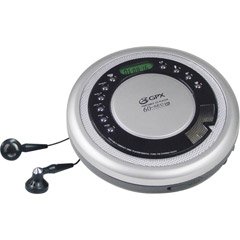
Figure 1: GPX CDP6806DT Personal CD Player. This image illustrates the compact design and general appearance of the device.
4. Kontrole in funkcije
Familiarize yourself with the controls and features of your GPX CDP6806DT for optimal use.
- LCD zaslon: 6-digit display for track number, time, and FM frequency.
- PREDVAJANJE/PAVZA (►/−): Press to start or pause CD playback.
- STOP (■): Press to stop CD playback.
- SKIP/SEARCH (◀◀/▶▶): Press to skip tracks. Hold to search within a track.
- GLASNOST (+/-): Prilagodi izhodni nivo zvoka.
- NAČIN/PROG: Selects playback mode (Repeat, Random) or programs CD tracks.
- FM TUNER (ON/OFF/BAND): Switches to FM radio mode, turns FM on/off, or changes FM band.
- PRESET (+/-): Navigates saved FM radio presets.
- Predal za CD-je: Area for inserting audio CDs.
- Predal za baterije: Located on the bottom, holds 2 AA batteries.
- Vhod za slušalke (3.5 mm): Priklopi slušalke za zasebno poslušanje.
Figure 2: GPX CDP6806DT Controls Layout. This image provides a visual reference for the location of various buttons and ports on the device.
5. Nastavitev
5.1 Namestitev baterije
The GPX CDP6806DT requires two (2) AA batteries (not included) for portable operation.
- Poiščite predal za baterije na spodnji strani enote.
- Odprite pokrov predalčka za baterije.
- Vstavite dve bateriji tipa AA in pri tem pazite na pravilno polarnost (+ in -), kot je označeno v predalu.
- Trdno zaprite pokrov prostora za baterije.
5.2 Priključitev slušalk
For private listening, connect your 3.5mm stereo headphones (not included) to the headphone jack located on the side of the unit.
6. Navodila za uporabo
6.1 Predvajanje CD-ja
The unit supports CD and CD-R/RW disc formats.
- Open the CD compartment lid by gently pressing the OPEN button (if present, or lifting the lid).
- CD postavite na sredinsko vreteno z nalepko navzgor.
- Pokrov predala za CD-je trdno zaprite, dokler ne klikne.
- Pritisnite PREDVAJANJE/PAVZA (►/−) button to begin playback. The track number and elapsed time will appear on the LCD display.
- Če želite začasno ustaviti predvajanje, pritisnite PREDVAJANJE/PAVZA (►/−). Za nadaljevanje znova pritisnite.
- Če želite ustaviti predvajanje, pritisnite STOP (■) gumb.
- Če želite preskočiti na naslednjo skladbo, pritisnite SKIP/SEARCH (▶▶).
- To go back to the beginning of the current track, press SKIP/SEARCH (◀◀) once. Press twice to go to the previous track.
- To search rapidly forward or backward within a track, hold down SKIP/SEARCH (▶▶) or (◀◀) oz.
- Glasnost prilagodite s tipko GLASNOST (+/-) nadzor.
6.2 Delovanje FM-radia
The unit features a digital FM tuner with station presets.
- Potisnite FM SPREJEMNIK switch to the ON position or press the BAND gumb za vstop v način FM.
- Pritisnite SKIP/SEARCH (▶▶) or (◀◀) gumbe za ročno uglaševanje želene frekvence.
- To auto-scan and save stations, hold down the PREDVAJANJE/PAVZA (►/−) button (or refer to specific instructions for auto-scan if available on the device).
- To recall saved presets, use the PREDNASTAVITEV (+/-) gumbi.
6.3 CD Programming (24-Track)
Programirate lahko do 24 skladb, ki se predvajajo v določenem vrstnem redu.
- With the CD stopped, press the MODE/PROG button. "PROG" will flash on the display.
- Uporabite SKIP/SEARCH (▶▶) or (◀◀) gumbe za izbiro prve skladbe, ki jo želite programirati.
- Pritisnite MODE/PROG again to confirm the selection. The display will show the program number and the next available program slot.
- Ponovite koraka 2 in 3, da v program dodate do 24 skladb.
- After programming all desired tracks, press PREDVAJANJE/PAVZA (►/−) za začetek programiranega predvajanja.
- Za brisanje programa pritisnite STOP (■) gumb dvakrat.
6.4 Zaščita pred preskakovanjem (ASP)
The GPX CDP6806DT features a 60-second Anti-Skip Protection system. This system buffers audio data to minimize interruptions caused by minor shocks or vibrations during CD playback. The ASP activates automatically when a CD is playing.
7. Vzdrževanje
7.1 Čiščenje enote
- Zunanjost enote obrišite z mehko, suho krpo.
- Ne uporabljajte abrazivnih čistil, voskov ali topil.
- If the CD lens needs cleaning, use a specialized CD lens cleaner disc or a soft, lint-free cloth designed for optical lenses.
7.2 Skrb za baterije
- Remove batteries if the unit is not used for an extended period to prevent leakage.
- Ne mešajte starih in novih baterij ali različnih vrst baterij.
- Izrabljene baterije zavrzite odgovorno v skladu z lokalnimi predpisi.
8. Odpravljanje težav
If you experience issues with your GPX CDP6806DT, please consult the following table for common problems and solutions.
| Težava | Možen vzrok/rešitev |
|---|---|
| Enota se ne vklopi. | Check if batteries are inserted correctly with proper polarity. Ensure batteries are fresh and not depleted. |
| Iz slušalk ni zvoka. | Ensure headphones are fully plugged into the headphone jack. Increase the volume level. Test with another pair of headphones. |
| CD skips or playback is interrupted. | Ensure the CD is clean and free of scratches or smudges. Clean the CD with a soft, lint-free cloth. Ensure the unit is on a stable surface or held steadily during use. |
| CD se ne predvaja. | Ensure the CD is inserted correctly with the label side up. Close the CD compartment lid completely. Check if the CD is a supported format (CD, CD-R/RW). |
| Sprejem FM radia je slab. | Extend the headphone cable as it acts as the antenna. Try moving to a different location. |
9. Specifikacije
- Znamka: GPX
- Model: CDP6806DT
- Podprti formati diskov: CD, CD-R / RW
- Zaščita proti preskoku: 60 sekund
- Zaslon: 6-mestni LCD
- Radio: Digital FM Tuner with Presets
- CD Programming: 24-stezni
- vir energije: 2 x AA baterije (niso vključene)
- Povezljivost: 3.5mm Headphone Jack (Auxiliary)
10. Garancija in podpora
For detailed warranty information, please refer to the warranty card included with your original product packaging. For technical support, service inquiries, or to purchase replacement parts, please visit the official GPX webspletno mesto ali se obrnite na njihov oddelek za pomoč strankam z uporabo kontaktnih podatkov, navedenih v dokumentaciji izdelka.
Za garancijske zahtevke shranite dokazilo o nakupu.