
Uvod
This manual provides essential information for the installation, operation, and maintenance of the HP Procurve 3500yl-48G-PWR Managed Ethernet Switch. This device is designed to offer advanced intelligent edge switching capabilities, supporting demanding networking features such as Quality of Service (QoS) and security. It features a variety of Gigabit interfaces, integrated Power over Ethernet (PoE) on all 10/100/1000Base-T ports, and 10-Gigabit Ethernet (10-GbE) capability.
Konec izdelkaview
The HP Procurve 3500yl-48G-PWR is a robust managed Ethernet switch. It is equipped with 44 x 10/100/1000Base-T ports and 4 x 10/100/1000Base-T ports, providing extensive connectivity options for various network environments. The integrated PoE functionality simplifies deployment of IP phones, wireless access points, and other PoE-powered devices.
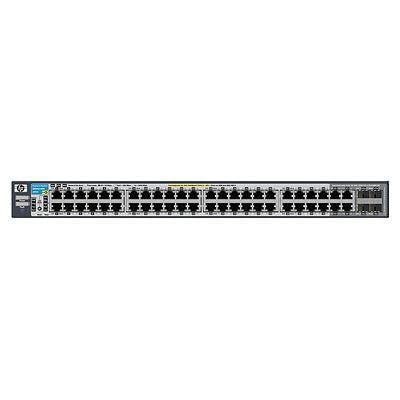
Slika 1: Spredaj view of the HP Procurve 3500yl-48G-PWR Managed Ethernet Switch, showing the 48 Ethernet ports and status indicators.
Nastavitev
1. Razpakiranje in pregled
Carefully remove the switch from its packaging. Inspect the device for any signs of physical damage. Report any damage to your supplier immediately.
2. Montaža v rack (neobvezno)
The switch is designed for standard 19-inch rack mounting. Use the provided rack-mount kit and screws to secure the switch in the rack. Ensure adequate ventilation around the unit.
3. Napajalni priključek
- Connect the power cord to the AC power inlet on the rear of the switch.
- Drugi konec napajalnega kabla priključite v ozemljeno električno vtičnico.
- Verify that the power LED on the front panel illuminates, indicating the switch is receiving power.
4. Omrežne povezave
Connect Ethernet cables from your network devices (computers, servers, other switches, access points) to the RJ45 ports on the front panel of the switch. The switch supports 10/100/1000Base-T connections. For PoE devices, simply connect them to any of the 48 ports; the switch will automatically detect and provide power if the device is PoE-compatible.
5. Dostop do začetne konfiguracije
For initial configuration, connect a console cable (typically RJ45 to DB9) from your management workstation to the console port on the switch. Use a terminal emulation program (e.g., PuTTY, Tera Term) with the following settings: 9600 baud, 8 data bits, no parity, 1 stop bit, no flow control. Alternatively, if the switch has a default IP address, you can connect via a web browser or SSH/Telnet after assigning your workstation an IP address in the same subnet.
Navodila za uporabo
1. Vklopite
Once connected to power, the switch will automatically power on. Observe the front panel LEDs for status indications.
2. LED indikatorji
- LED za napajanje: Označuje stanje napajanja. Sveti zeleno za normalno delovanje.
- LED lučke za stanje vrat: Each port has an LED indicating link status and activity. Typically, solid green indicates a link, and blinking green indicates activity. Amber may indicate a 10/100 Mbps link, while green indicates a 1000 Mbps link, depending on the specific model's LED scheme. Refer to the detailed LED guide in the full product documentation for precise interpretations.
- LED-diode stanja PoE: Indicate Power over Ethernet status for each port.
3. Basic Network Operation
The switch operates as a Layer 2 device, forwarding Ethernet frames between connected devices. With its managed capabilities, you can configure VLANs, Spanning Tree Protocol (STP), Link Aggregation (LAG), and other advanced features via the command-line interface (CLI) or webvmesnik za upravljanje.
4. Napredne funkcije
The Procurve 3500yl-48G-PWR supports advanced features such as Quality of Service (QoS) for prioritizing network traffic, robust security features to protect your network, and 10-GbE uplink capabilities (if equipped with optional modules) for high-bandwidth connections.
Vzdrževanje
1. Čiščenje
Periodically clean the exterior of the switch with a soft, dry cloth. Do not use liquid or aerosol cleaners. Ensure ventilation openings are free from dust and obstructions to maintain proper airflow.
2. Posodobitve vdelane programske opreme
Redno preverjajte proizvajalčeve webspletno mesto za posodobitve vdelane programske opreme. Posodabljanje vdelane programske opreme zagotavlja optimalno delovanje, varnost in dostop do novih funkcij. Pazljivo upoštevajte navodila, ki so priložena paketu za posodobitev vdelane programske opreme.
3. Okoljski vidiki
Operate the switch within its specified temperature range (up to 40 degrees Celsius). Avoid exposing the device to excessive heat, humidity, or direct sunlight. Ensure proper airflow around the unit to prevent overheating.
Odpravljanje težav
1. Brez moči
- Preverite, ali je napajalni kabel varno priključen tako na stikalo kot na električno vtičnico.
- Preverite delovanje vtičnice z drugo napravo.
- Ensure the power supply unit (if external) is properly connected and functional.
2. No Link on a Port
- Check the Ethernet cable for damage and ensure it is securely plugged into both the switch port and the connected device.
- Preverite, ali je priključena naprava vklopljena in deluje pravilno.
- Try a different port on the switch or a different Ethernet cable.
- Check the port configuration in the switch's management interface to ensure it is enabled and correctly configured.
3. Težave z omrežno povezljivostjo
- Confirm IP address settings on connected devices and the switch.
- Check for conflicting IP addresses on the network.
- Review switch configuration for VLANs, routing, or security policies that might be blocking traffic.
- Ponovno zaženite stikalo in priključene naprave.
If issues persist, consult the comprehensive troubleshooting guide available on the manufacturer's support webspletno mesto ali se obrnite na tehnično podporo.
Specifikacije
| Funkcija | Specifikacija |
|---|---|
| Znamka | HEWLETT PACKARD |
| Številka modela | J8693A |
| Število vrat | 48 (44 x 10/100/1000Base-T, 4 x 10/100/1000Base-T) |
| Hitrost prenosa podatkov | 1000 megabitov na sekundo |
| Vmesnik | PoE, RJ45 |
| Tip stikala | Upravljano |
| voltage | 48 voltov (DC) |
| Teža predmeta | 16.1 funta |
| Ocena zgornje temperature | 40 stopinj Celzija |
| Vrsta materiala ohišja | Kovina |
| Združljive naprave | Namizje |
Garancija in podpora
This product is subject to the manufacturer's warranty policy. For specific details regarding warranty length and coverage, please contact the manufacturer directly. Please note that returns for non-defective items may be subject to a restocking fee. Any merchandise returned for repair and found not to be defective by technicians will incur a 25% restocking fee. By purchasing this product, you acknowledge and accept these procedures.
For technical support, documentation, and additional resources, please visit the official HP Procurve support webali se obrnite na njihov oddelek za pomoč uporabnikom.