
1. Uvod
This manual provides comprehensive instructions for the setup, operation, maintenance, and troubleshooting of your COBY CR-A78 AM/FM Digital Alarm Clock with Time Projector. Please read this manual thoroughly before using the device to ensure proper function and to maximize your user experience. Keep this manual for future reference.
2. Izdelek je končanview
The COBY CR-A78 is a versatile digital alarm clock featuring an AM/FM radio tuner and a unique time projection function. It is designed to provide reliable timekeeping, alarm functions, and radio entertainment, with the added convenience of projecting the current time onto a wall or ceiling.
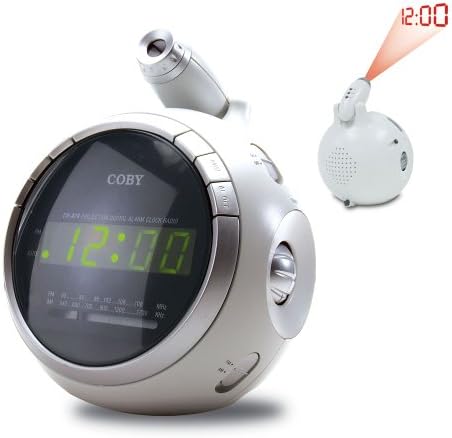
Slika 2.1: Spredaj view of the COBY CR-A78 digital alarm clock, showing the green LED display and the adjustable time projector. An inset image illustrates the time '12:00' being projected onto a surface.
3. Lastnosti
- AM/FM Digital Tuner: Za poslušanje vaših najljubših radijskih postaj.
- Large Green LED Display: Provides clear visibility of the time.
- Integrated Time Projector: Projects the current time onto a wall or ceiling for easy viewing.
- Funkcija dvojnega alarma: Set two independent alarms for different wake-up times.
- Funkcija dremeža: Omogoča začasno prekinitev alarma.
- Časovnik spanja: Fall asleep to music with an automatic shut-off feature.
- Varnostno kopiranje baterije: Ohranja nastavitve časa in alarma med izpadom električne energijetages (requires 9V battery, not included).
4. Vsebina paketa
- COBY CR-A78 AM/FM Digital Alarm Clock
- AC napajalnik
- Uporabniški priročnik (ta dokument)
5. Nastavitev
5.1. Napajalni priključek
- Insert the small end of the AC power adapter into the DC IN jack located on the back of the unit.
- Plug the other end of the AC power adapter into a standard wall outlet (AC 120V, 60Hz).
- The unit will power on, and the display will flash, indicating it is ready for time setting.
5.2. Namestitev rezervne baterije
A 9-volt battery (not included) can be installed to provide backup power for the clock and alarm settings during a power interruption.
- Poiščite pokrov predala za baterije na spodnji strani enote.
- Remove the cover by sliding it off.
- Connect a 9-volt battery to the battery connector inside the compartment, observing polarity (+ and -).
- Place the battery into the compartment and replace the cover securely.
6. Navodila za uporabo
6.1. Nastavitev časa
- Pritisnite in držite ČAS NAST gumb, dokler ne začnejo utripati številke za uro.
- Pritisnite URA Večkrat pritisnite gumb , da nastavite uro. Za pravilno nastavitev AM/PM opazujte indikator PM.
- Pritisnite MINUTA button repeatedly to adjust the minute.
- Pritisnite ČAS NAST ponovno pritisnite gumb za potrditev in izhod iz načina nastavitve časa.
6.2. Nastavitev alarma
The CR-A78 features two independent alarms, Alarm 1 and Alarm 2.
- Pritisnite in držite ALARM 1 NAST (oz ALARM 2 NAST) button until the alarm hour digits flash.
- Pritisnite URA gumb za nastavitev želene ure budilke.
- Pritisnite MINUTA gumb za nastavitev želene minute alarma.
- Pritisnite ALARM 1 NAST (oz ALARM 2 NAST) button again to confirm the alarm time.
- Za vklop alarma potisnite ALARM 1 VKLOP/IZKLOP (oz ALARM 2 VKLOP/IZKLOP) switch to the 'ON' position. Select 'BUZZER' for a beeping alarm or 'RADIO' to wake to the radio.
6.3. Uporaba funkcije dremeža
Ko se oglasi alarm, pritisnite tipko DREMEŽ button. The alarm will temporarily stop and sound again after approximately 9 minutes. To turn off the alarm completely, press the VKLOP / IZKLOP ALARMA switch to 'OFF'.
6.4. Delovanje radia (AM/FM)
- Pritisnite RADIO VKLOP/IZKLOP gumb za vklop radia.
- Potisnite AM/FM switch to select the desired band.
- Zavrtite UGLAŠEVANJE knob to find your desired station.
- Glasnost prilagodite s tipko GLASNOST gumb.
- Če želite izklopiti radio, pritisnite RADIO VKLOP/IZKLOP gumb znova.
6.5. Using the Time Projector
- Locate the projector lens on top of the unit.
- Pritisnite VKLOP/IZKLOP PROJEKTORJA button to activate the time projection.
- Rotate the projector lens to adjust the focus of the projected time.
- Adjust the angle of the projector arm to direct the time onto your desired surface (wall or ceiling).
- Pritisnite VKLOP/IZKLOP PROJEKTORJA button again to turn off the projection.
7. Vzdrževanje
- Čiščenje: Za čiščenje zunanjosti enote uporabite mehko, suho krpo. Ne uporabljajte abrazivnih čistil ali topil.
- Nega leč: Gently wipe the projector lens with a soft, lint-free cloth if it becomes dusty.
- Umestitev: Napravo postavite na stabilno, ravno površino, stran od neposredne sončne svetlobe, virov toplote in prekomerne vlage.
- Zamenjava baterije: Replace the 9-volt backup battery annually or if the unit experiences frequent power outages to ensure continuous backup functionality.
8. Odpravljanje težav
| Težava | Možen vzrok | rešitev |
|---|---|---|
| Enota se ne vklopi. | Napajalnik ni pravilno priključen. | Prepričajte se, da je napajalnik varno priključen na enoto in delujočo stensko vtičnico. |
| Alarm se ne oglasi. | Alarm ni aktiviran ali je napačno nastavljen. | Verify the alarm time is set correctly and the ALARM ON/OFF switch is in the 'ON' position (BUZZER or RADIO). |
| Radijski sprejem je slab. | Antenna not extended or unit too close to interference. | Extend the FM wire antenna fully. For AM, rotate the unit for best reception. Move away from other electronic devices. |
| Predvideni čas je zamegljen. | Projector focus not adjusted. | Rotate the projector lens to adjust the focus until the time is clear. |
| Izguba časa/nastavitev po izpadu električne energijetage. | Rezervna baterija je prazna ali ni nameščena. | Install a fresh 9-volt battery or replace the existing one. |
9. Specifikacije
| Funkcija | Specifikacija |
|---|---|
| Znamka | Coby |
| Model | CR-A78 |
| Vrsta zaslona | Digitalna LED (zelena) |
| Radijski sprejemnik | Analogni AM/FM |
| Vir napajanja | AC 120 V, 60 Hz |
| Rezervna baterija | 1 x 9V baterija (ni priložena) |
| Mere izdelka (D x Š x V) | 12.7 x 10.16 x 15.24 cm (5 x 4 x 6 palca) |
| Teža izdelka | 567 g (1.25 lbs) |
| barva | Srebrna |
10. Garancija in podpora
For warranty information or technical support, please refer to the documentation provided at the time of purchase or contact Coby customer service. Keep your purchase receipt as proof of purchase for any warranty claims.