
1. Končanoview
The Canon PowerShot SD450 Digital ELPH camera is a compact digital camera designed for ease of use and high-quality imaging. It features a 5.0-megapixel sensor, a 3x optical zoom lens, and a 2.5-inch LCD display. The camera incorporates Canon's DIGIC II processor for efficient image processing and offers various shooting modes to suit different photographic situations.

Slika 1.1: Spredaj view of the Canon PowerShot SD450 Digital ELPH camera with its lens retracted.
2. Kaj je v škatli
Preverite, ali so v vašem paketu priloženi vsi naslednji elementi:
- PowerShot SD450 body
- Litijeva baterija NB-4L
- Battery charger CB-2LV
- 16 MB SD memory card SDC-16M
- Zapestni pašček WS-600
- Digital Camera Solution CD-ROM
- Vmesniški kabel USB IFC-400PCU
- Audio-video cable AVC-DC300
3. Nastavitev
3.1. Polnjenje baterije
- Insert the Lithium battery pack NB-4L into the battery charger CB-2LV.
- Polnilnik priključite v električno vtičnico. Lučka indikatorja polnjenja bo zasvetila.
- Ko je polnjenje končano, se bo indikatorska lučka spremenila ali ugasnila. Odstranite baterijo.
3.2. Vstavljanje baterije in SD-kartice
- Odprite pokrov predalčka za baterijo/kartico, ki se nahaja na spodnji strani fotoaparata.
- Napolnjeno baterijo vstavite v predal in pazite na pravilno orientacijo.
- Insert the SD memory card into the card slot until it clicks into place.
- Varno zaprite pokrov predelka.
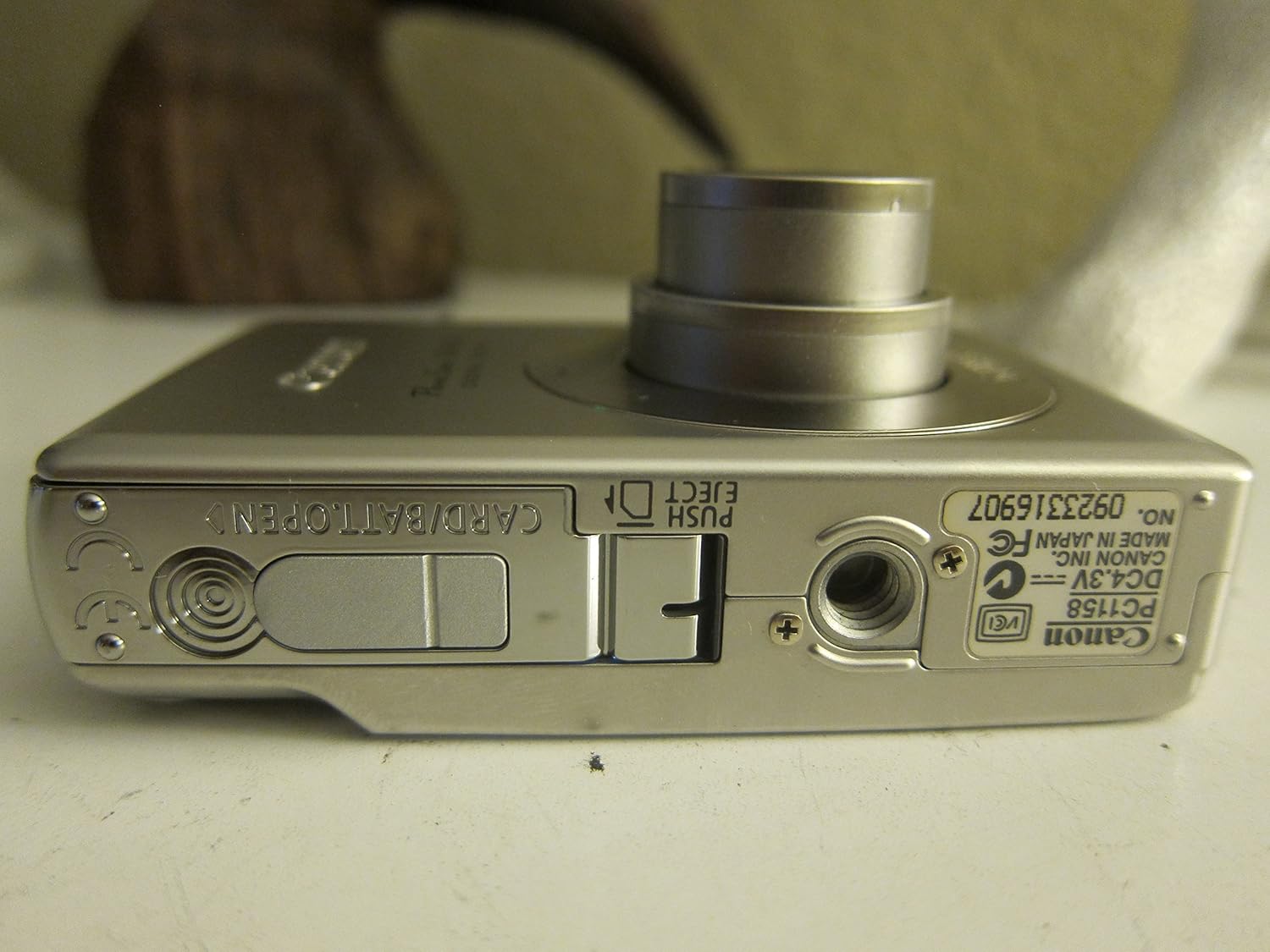
Slika 3.1: Spodaj view of the camera, illustrating the battery and SD card compartment.
3.3. Začetni vklop in osnovne nastavitve
- Pritisnite VKLOP/IZKLOP gumb za vklop kamere.
- Sledite navodilom na zaslonu, da nastavite datum, čas in jezik.

Slika 3.2: Zgornji del view of the camera, highlighting the power button and shutter release.
4. Upravljanje kamere
4.1 Osnove fotografije
- Vklop/izklop: Pritisnite VKLOP/IZKLOP gumb.
- Fotografiranje: Pritisnite sprožilec do polovice, da izostrite sliko, nato pa ga pritisnite do konca, da posnamete sliko.
- Zoom: Za nastavitev 3-kratnega optičnega zooma uporabite ročico za zoom okoli sprožilca.

Slika 4.1: Spredaj view of the camera with the optical zoom lens extended.
4.2. Načini fotografiranja
The PowerShot SD450 offers various shooting modes to optimize settings for different scenes. Rotate the mode dial to select:
- Samodejno: Camera automatically sets optimal exposure and focus.
- Ročno: Allows for more control over settings like white balance and color tones (black and white, sepia, vivid, neutral).
- Portret: Zamegli ozadje, da poudari motiv.
- Pokrajina: Ensures sharp focus on distant subjects.
- Nočni posnetek: For shooting in low light conditions.
- Scenski načini: Includes specific settings for Kids & Pets, Foliage, Fireworks, Snow, Underwater, Beach, and Indoor.
- Moje barve: Apply special effects like Color Swap or Custom Color directly in-camera.
4.3. Focusing and Exposure
- AiAF: The 9-point Artificial Intelligence Auto Focus system automatically focuses on subjects, even if off-center.
- Nadzor izpostavljenosti: Select from Evaluative, Center-weighted, or Spot metering.
- ISO občutljivost: Adjustable to Auto, 50, 100, 200, or 400 to control light sensitivity.
4.4. Video snemanje
The camera can record high-quality movies:
- Resolucije: VGA (640x480) or QVGA (320x240) at 30 or 15 frames per second.
- Način snemanja videoposnetkov s hitro hitrostjo sličic: Records at 60 frames per second for slow-motion playback.
- Compact Movie Mode (QQVGA): 160x120 at 15 frames per second, suitable for email sharing.
- Continuous filming is available until the file size reaches 1 GB or 60 minutes.
4.5. Predvajanje in ponovnoview
Za ponovnoview vaše fotografije in videoposnetki:
- Pritisnite Predvajanje gumb.
- Use the directional pad to navigate through images and videos.
- Intelligent Orientation Sensor: Automatically rotates stored images for correct playback when the camera is rotated.
- Slideshow Functions: Create impressive slideshows with transition effects directly on the camera.

Slika 4.2: Zadaj view of the camera, showing the LCD display during image playback.
4.6. Printing Images
The PowerShot SD450 supports direct printing:
- PictBridge: Connect directly to PictBridge-compatible printers (e.g., Canon PIXMA printers) for printing without a PC.
- Gumb Natisni/Deli: Simplifies direct printing and image uploading to Windows XP or Mac OS X.
5. Vzdrževanje
5.1. Čiščenje fotoaparata
- Za čiščenje ohišja fotoaparata uporabite mehko, suho krpo.
- For the lens and LCD screen, use a lens cleaning cloth and specialized cleaning solution if necessary. Avoid harsh chemicals.
5.2. Skrb za baterijo
- Ko baterije ne uporabljate, jih hranite na hladnem in suhem mestu.
- Izogibajte se pogostemu popolnemu praznjenju baterije, da podaljšate njeno življenjsko dobo.
- Recharge the battery using only the provided Canon charger.
5.3. Shranjevanje
- When storing the camera for extended periods, remove the battery.
- Store the camera in a protective case to prevent dust and scratches.
6. Odpravljanje težav
| Težava | rešitev |
|---|---|
| "Memory Error" message appears. |
|
| Slike so zamegljene. |
|
| Flash is too strong or washes out subjects. |
|
| Baterija se hitro izprazni. |
|
| Kamera se ne vklopi. |
|
7. Specifikacije
| Znamka | Canon |
| Ime modela | Canon PowerShot SD450 |
| Učinkovita še vedno ločljivost | 5 milijonov slikovnih pik |
| Optični zoom | 3x |
| Velikost zaslona | 2.5 palcev |
| Stabilizacija slike | Digitalni, optični |
| Razpon ISO | Samodejno, 50, 100, 200, 400 |
| Najmanjša hitrost zaklopa | 15 sekund |
| Največja hitrost zaklopa | 1/1500 sekunde |
| Ločljivost zajema videa | SD VGA 480p |
| Format za zajem videa | AVI |
| File Oblika | JPEG, RAW |
| Dimenzije (D x Š x V) | 3.39 x 0.87 x 2.13 palcev |
| Teža predmeta | 5.44 unč |
| barva | Srebrna |
| Ima samosprožilec | ja |
| Stopnja vodoodpornosti | Ni vodoodporen |
8. Garancija in podpora
Za podrobne informacije o garanciji glejte garancijski list, ki je priložen izdelku, ali obiščite uradno spletno mesto Canon website. The camera comes bundled with Canon software (ZoomBrowser EX 5.5, PhotoRecord 2.2, ImageBrowser 5.5, PhotoStitch 3.1, Movie Edit Task) for image management and editing. Purchasers are also eligible for membership to Canon iMAGE Gateway for additional support and services.
For technical support, driver downloads, or service inquiries, please visit the official Canon support webali se obrnite na Canonovo službo za stranke.