
KINYO GZ-501
KINYO GZ-501 GameZone 5.1 Surround Sound System User Manual
Model: GZ-501
Uvod
Hvala za nakupasing the KINYO GZ-501 GameZone 5.1 Surround Sound System. This system is designed to provide an immersive audio experience for gaming, movies, and music. It features five pre-amplified satellite speakers and an extended throw subwoofer for enhanced bass performance. This manual provides essential information for the proper setup, operation, and maintenance of your new sound system.
Kaj je v škatli
Prosimo, preverite vsebino paketa in se prepričajte, da so prisotni vsi elementi:
- 1 x Subwoofer Unit (main unit)
- 5 x Satellite Speakers (Front Left, Front Right, Center, Rear Left, Rear Right)
- 1 x daljinski upravljalnik
- Audio Connection Cables (RCA type)
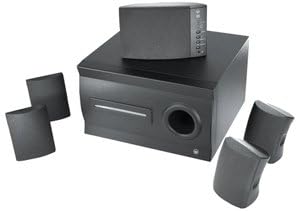
Image: The KINYO GZ-501 system showing the central subwoofer unit and the five satellite speakers arranged around it. The subwoofer is a dark, rectangular unit with a port on the front, and the satellite speakers are compact, dark-colored units.
Nastavitev
Follow these steps to set up your KINYO GZ-501 system:
- Umestitev: Position the subwoofer on the floor, preferably near your display. Place the center speaker directly above or below your display. Position the front left and right speakers equidistant from the display, facing the listening area. Place the rear left and right speakers behind the listening area, also equidistant from each other.
- Priključitev satelitskih zvočnikov: Connect each of the five satellite speakers to the corresponding output jacks on the rear of the subwoofer unit. Ensure that the speaker wires are securely connected to the correct channels (Front L/R, Center, Rear L/R). The speaker wires are built into the speakers.
- Povežite se z zvočnim virom: Use the provided RCA audio cables to connect the subwoofer unit to your audio source (e.g., PC sound card, game console, DVD player). The system supports Dolby Digital & DTS ready inputs. Match the color-coded RCA plugs to the corresponding input jacks on the subwoofer and your audio source.
- Napajalni priključek: Plug the power cord from the subwoofer unit into a standard AC power outlet.
- Vklop: Turn on the system using the power button on the subwoofer unit or the remote control.
Navodila za uporabo
Once your system is set up, you can begin using it:
- Vklop/izklop: Press the Power button on the remote control or the main unit to turn the system on or off.
- Nadzor glasnosti: Use the 'Volume Up' and 'Volume Down' buttons on the remote control to adjust the overall system volume. The blue lights on the center channel will flash to indicate volume changes.
- Izbira vnosa: The system features a built-in 3-way system selector. Use the 'Input' or 'Source' button on the remote control or the main unit to cycle through available audio inputs (e.g., PC, DVD, Game).
- Ravnovesje zvočnikov: While the system does not offer individual speaker volume adjustments, ensure your audio source (PC sound card, game console) is configured for 5.1 surround sound output to optimize channel balance.
Vzdrževanje
Proper care will ensure the longevity of your KINYO GZ-501 system:
- Čiščenje: Use a soft, dry cloth to clean the surfaces of the speakers and subwoofer. Do not use liquid cleaners or abrasive materials, as they may damage the finish.
- Prezračevanje: Ensure that the subwoofer unit has adequate ventilation. Do not block the vents or place the unit in an enclosed space that could lead to overheating.
- Magnetna zaščita: The speakers are magnetically shielded to protect your monitor and recording media from interference. Avoid placing strong magnetic objects directly next to the speakers.
- Shranjevanje: Če sistem shranjujete dalj časa, ga izključite iz električnega omrežja in shranite na hladnem in suhem mestu, stran od neposredne sončne svetlobe in ekstremnih temperatur.
Odpravljanje težav
If you encounter issues with your KINYO GZ-501 system, refer to the following common problems and solutions:
| Težava | Možen vzrok | rešitev |
|---|---|---|
| Iz nobenega zvočnika ni zvoka. | Power not connected or system off; incorrect input selected; audio cables loose. | Ensure power cord is securely plugged in and system is turned on. Verify correct input source is selected. Check all audio cable connections. |
| No sound from specific speakers (e.g., rear, center). | Speaker not connected properly; audio source not outputting 5.1 surround sound. | Check the connection of the specific speaker to the subwoofer. Ensure your audio source (PC, console) is configured for 5.1 channel output. |
| Popačen ali nejasen zvok. | Volume too high; poor audio source quality; loose connections. | Reduce the volume. Test with a different audio source. Check all cable connections for tightness. |
| Daljinski upravljalnik ne deluje. | Batteries drained; obstruction between remote and unit. | Replace remote control batteries. Ensure no objects are blocking the remote's signal path to the subwoofer. |
| Subwoofer rattling or weak bass. | Subwoofer placed on unstable surface; volume too high for bass capabilities. | Ensure the subwoofer is on a stable, flat surface. Reduce overall volume if rattling persists. |
Specifikacije
Detailed technical specifications for the KINYO GZ-501 GameZone 5.1 Surround Sound System:
| Funkcija | Podrobnost |
|---|---|
| Ime modela | GZ-501 |
| Vrsta zvočnika | Satelit |
| Konfiguracija kanala za prostorski zvok | 5.1 |
| Največja izhodna moč zvočnika | 25 vatov |
| Premer nizkotonca | 5 palcev |
| Premer nizkotonca | 5.25 palcev |
| Tehnologija povezljivosti | RCA (žično) |
| Združljive naprave | Osebni računalnik, televizija |
| Nadzorna metoda | Daljinski upravljalnik |
| Vir napajanja | Električni na kabel |
| Teža predmeta | 16.25 funta |
| Dimenzije izdelka (DxŠxV) | 14.9 x 14.6 x 12.2 palcev |
Garancija in podpora
For warranty information and technical support, please refer to the documentation provided at the time of purchase or visit the official KINYO webspletnega mesta. Shranite dokazilo o nakupu za uveljavljanje garancije.
For further assistance, you may contact KINYO customer service through their official channels. Please have your model number (GZ-501) and purchase details ready when contacting support.
Ask a question about this manual
Ask about setup, troubleshooting, compatibility, parts, safety, or missing instructions. Manuals+ will review the question and use this page’s manual context to help answer it.