
1. Uvod
Thank you for choosing the Grundig RRCD 4305 Freaxx 50 CD/MP3 Cassette Radio. This manual provides essential information for the safe and efficient operation of your device. Please read it thoroughly before use and retain it for future reference.
2. Varnostna navodila
- vir energije: Prepričajte se, da je napajalnik voltage se ujema z nazivno vrednostjo, navedeno na enoti.
- Prezračevanje: Ne blokirajte prezračevalnih odprtin. Okoli enote pustite dovolj prostora za pravilen pretok zraka.
- Voda in vlaga: Naprave ne izpostavljajte dežju, vlagi ali kapljajočim/brizgajočim tekočinam. Hranite stran od vodnih virov.
- Toplota: Izogibajte se postavljanju enote v bližino virov toplote, kot so radiatorji, grelniki, štedilniki ali druge naprave, ki proizvajajo toploto.
- Čiščenje: Disconnect the unit from the power source before cleaning. Use a soft, dry cloth.
- Servisiranje: Ne poskušajte servisirati enote sami. Vsa servisna dela prepustite usposobljenemu serviserju.
- Baterije: Follow proper polarity when inserting batteries. Do not mix old and new batteries or different types of batteries. Remove batteries if the unit is not used for extended periods.
3. Izdelek je končanview
Familiarize yourself with the main components and controls of your Grundig RRCD 4305 Freaxx 50.
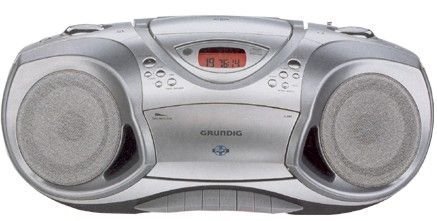
Slika 1: Spredaj view of the Grundig RRCD 4305 Freaxx 50, showing the CD compartment, cassette deck, and control buttons.
Kontrole in indikatorji:
- Gumb za vklop: Vklopi ali izklopi enoto.
- Nadzor glasnosti: Prilagodi izhodni nivo zvoka.
- Izbirnik funkcij: Switches between CD, Radio, Cassette, and AUX modes.
- Tuning Knob (Radio): Prilagodi radijsko frekvenco.
- Band Selector (Radio): Selects AM/FM radio bands.
- CD/MP3 Controls: Play/Pause, Stop, Skip Forward/Backward, Folder Up/Down.
- Cassette Controls: Predvajanje, ustavitev/izmet, hitro previjanje naprej, previjanje nazaj, snemanje.
- Zaslon: Prikazuje trenutni način, številko skladbe ali radijsko frekvenco.
4. Nastavitev
4.1 Razpakiranje
- Enoto previdno vzemite iz embalaže.
- Check for any damage that may have occurred during transit. If damaged, do not operate the unit and contact your dealer.
- Embalažni material shranite za kasnejši transport ali shranjevanje.
4.2 Napajalni priključek
The unit can be powered by AC mains or batteries.
AC napajanje:
- Connect the supplied AC power cord to the AC IN socket on the rear of the unit.
- Drugi konec napajalnega kabla priključite v standardno stensko vtičnico.
Moč baterije:
- Odprite pokrov predalčka za baterije na spodnji strani enote.
- Insert the required number of 'C' size batteries (not supplied), ensuring correct polarity (+/-).
- Trdno zaprite pokrov prostora za baterije.
4.3 antena
- For FM reception, extend the telescopic antenna fully. Adjust its position for optimal signal reception.
- For AM reception, the unit uses a built-in ferrite bar antenna. Rotate the entire unit for best AM reception.
5. Navodila za uporabo
5.1 Osnovna operacija
- Pritisnite MOČ gumb za vklop enote.
- Prilagodite GLASNOST nastavite želeno raven poslušanja.
- Pritisnite MOČ ponovno gumb, da izklopite enoto.
5.2 Radijsko delovanje
- Nastavite IZBIRNIK FUNKCIJ to 'RADIO'.
- Izberite želeni frekvenčni pas (AM ali FM) z uporabo IZBIRNIK PASA stikalo.
- Zavrtite UGLAŠEVANJE gumb, da poiščete želeno radijsko postajo.
- Prilagodite anteno za optimalen sprejem.
5.3 CD/MP3 Playback
- Nastavite IZBIRNIK FUNKCIJ to 'CD'.
- Open the CD compartment cover by pressing the 'OPEN' button.
- Place a CD or MP3 disc onto the spindle with the label side facing up.
- Close the CD compartment cover. The unit will read the disc.
- Pritisnite PREDVAJAJ/PAVZA gumb za začetek predvajanja.
- Uporabite PRESKOČI NAPREJ/NAZAJ gumbi za navigacijo med skladbami.
- For MP3 discs, use the FOLDER UP/DOWN buttons to navigate between folders.
- Pritisnite STOP za ustavitev predvajanja.
5.4 Predvajanje in snemanje kaset
Predvajanje:
- Nastavite IZBIRNIK FUNKCIJ to 'TAPE'.
- Pritisnite ZAUSTAVI/IZVRNI gumb za odpiranje predala za kasete.
- Vstavite kaseto z odprtim robom navzgor.
- Zaprite predal za kasete.
- Pritisnite IGRAJ gumb za začetek predvajanja.
- Uporaba HITRO NAPREJ or PREVIJAJ NAZAJ buttons to quickly move through the tape.
- Pritisnite ZAUSTAVI/IZVRNI to stop playback and open the compartment.
Recording (from Radio/CD/AUX):
- Vstavite prazno kaseto v predal.
- Select the desired source (RADIO, CD, or AUX) using the IZBIRNIK FUNKCIJ.
- Začnite predvajanje na viru (npr. predvajajte CD, uglasite radijsko postajo).
- Pritisnite SNEMANJE button (usually red) and the IGRAJ button simultaneously on the cassette deck. Recording will begin.
- Pritisnite ZAUSTAVI/IZVRNI gumb za konec snemanja.
5.5 Pomožni vhod (AUX)
- Connect an external audio device (e.g., smartphone, MP3 player) to the AUX IN jack using a 3.5mm audio cable (not supplied).
- Nastavite IZBIRNIK FUNKCIJ to 'AUX'.
- Control playback from your external device. The unit will output the audio.
6. Vzdrževanje
6.1 Čiščenje enote
- Pred čiščenjem enoto vedno izključite iz električne vtičnice.
- Za brisanje zunanjih površin uporabite mehko, suho krpo.
- Ne uporabljajte abrazivnih čistil, voskov ali topil, saj lahko poškodujejo premaz.
6.2 CD Lens Care
- Do not touch the CD lens.
- If the lens is dirty, use a commercially available CD lens cleaner.
6.3 Cassette Deck Care
- Periodically clean the tape heads, capstan, and pinch roller using a cotton swab lightly moistened with isopropyl alcohol.
- Demagnetize the tape heads regularly with a tape head demagnetizer to prevent sound degradation.
6.4 Zamenjava baterije
- When battery power is low, the unit's performance may degrade. Replace all batteries with new ones.
- Refer to section 4.2 for battery insertion instructions.
- Izrabljene baterije zavrzite odgovorno v skladu z lokalnimi predpisi.
7. Odpravljanje težav
| Težava | Možen vzrok | rešitev |
|---|---|---|
| Brez moči | Napajalni kabel ni priključen; Baterije so prazne ali nepravilno vstavljene. | Check AC cord connection; Replace batteries, ensuring correct polarity. |
| Brez zvoka | Glasnost je prenizka; Izbrana napačna funkcija; Priključene so slušalke. | Increase volume; Select correct function (CD/Radio/Tape/AUX); Disconnect headphones. |
| CD/MP3 disc skips or does not play | Disc dirty or scratched; Disc inserted incorrectly; Lens dirty. | Clean or replace disc; Reinsert disc correctly; Clean CD lens. |
| Slab radijski sprejem | Antena ni iztegnjena/nastavljena; Slab signal. | Extend and adjust FM antenna; Rotate unit for AM reception; Try moving the unit to a different location. |
| Cassette playback distorted | Tape heads dirty or demagnetized; Worn tape. | Clean and demagnetize tape heads; Try a different tape. |
8. Specifikacije
- Napajanje: AC 230V ~ 50Hz or DC 9V (6 x 'C' size batteries)
- Radio frekvenca:
- FM: 87.5 - 108 MHz
- AM: 522 - 1620 kHz
- CD predvajalnik: Supports CD-R/RW, MP3 playback
- Deck za kasete: Stereo playback and recording
- Avdio vhod: 3.5 mm priključek AUX-IN
- Izhodna moč: [Specific wattage, if known, otherwise omit or state 'Typical']
- Dimenzije (Š x V x G): [Specific dimensions, if known, otherwise omit]
- Teža: [Specific weight, if known, otherwise omit]
Specifications are subject to change without notice for continuous product improvement.
9. Garancija in podpora
Grundig products are manufactured to high quality standards and are warranted against manufacturing defects. For detailed warranty information, please refer to the warranty card included with your purchase or visit the official Grundig website. For technical support or service inquiries, please contact your local Grundig service center or authorized dealer.
Več informacij in podpore lahko najdete na Grundig Brand Store.