
1. Uvod
This manual provides instructions for the setup, operation, and maintenance of your Bose MediaMate Computer Speakers. These speakers are designed to enhance the audio experience for your computer, whether for music, movies, or gaming. The compact design and upward-angled sound projection optimize audio delivery for desktop use, occupying minimal desk space.
2. Varnostne informacije
Please read and follow all safety instructions before using this product to prevent electric shock, fire, or injury. Keep this manual for future reference.
- Zvočnikov ne izpostavljajte vodi ali vlagi.
- Zvočnikov ne postavljajte v bližino virov toplote, kot so radiatorji, grelniki, peči ali druge naprave (vključno amplifiers), ki proizvajajo toploto.
- Uporabljajte samo priključke/dodatke, ki jih je določil proizvajalec.
- Izklopite napravo med nevihtami ali ko je dlje časa ne uporabljate.
- Za vse servise se obrnite na usposobljeno servisno osebje. Servis je potreben, če je bil aparat kakor koli poškodovan, na primer poškodovan je napajalni kabel ali vtič, je bila polita tekočina ali so v aparat padli predmeti, je bil aparat izpostavljen dežju ali vlagi, ne deluje normalno , ali je bil opuščen.
3. Vsebina paketa
Preverite, ali so v paketu vsi elementi:
- Bose MediaMate Computer Speakers (2 units)
- Napajalni adapter
- Audio Cable (3.5mm stereo jack)
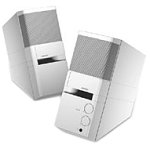
Image: The Bose MediaMate Computer Speakers in Gray. The image shows two compact speakers, one with visible volume and mix controls, and a headphone jack.
4. Nastavitev
Follow these steps to set up your Bose MediaMate Computer Speakers:
- Umestitev: Place the speakers on a flat, stable surface on either side of your computer monitor. Ensure they are angled slightly upward towards your listening position for optimal sound.
- Priključite avdio kabel: Connect the 3.5mm audio cable from the back of the primary speaker (the one with controls) to the audio output jack on your computer.
- Priključite napajanje: Plug the power adapter into the power input on the primary speaker, then plug the adapter into a wall outlet.
- Vklop: Turn on the speakers using the volume knob. The power indicator light should illuminate.
5. Navodila za uporabo
Once set up, operating your MediaMate speakers is straightforward:
- Nadzor glasnosti: Use the large knob labeled "VOLUME" on the front of the primary speaker to adjust the overall sound level.
- Nadzor mešanice: The "MIX" knob allows you to blend audio from two different sources if you have a second device connected to the auxiliary input.
- Priključek za slušalke: For private listening, plug your headphones into the headphone jack located on the front of the primary speaker. This will mute the speakers.
- Dvojni vhodi: The speakers feature dual inputs, allowing you to connect and mix two audio sources simultaneously. For example, you can connect your computer and a portable music player.
6. Vzdrževanje
To ensure the longevity and optimal performance of your speakers:
- Čiščenje: Use a soft, dry cloth to clean the exterior surfaces of the speakers. Do not use liquid cleaners or aerosols.
- Prah: Regularly dust the speaker grilles to prevent accumulation that could affect sound quality.
- Shranjevanje: Če zvočnike shranjujete dalj časa, jih izključite iz električnega omrežja in shranite na hladnem in suhem mestu.
7. Odpravljanje težav
If you encounter issues with your Bose MediaMate speakers, refer to the following common problems and solutions:
| Težava | Možen vzrok | rešitev |
|---|---|---|
| Brez zvoka |
|
|
| Popačen zvok |
|
|
| Deluje samo en zvočnik |
|
|
8. Specifikacije
- Znamka: Bose
- Model: MediaMate
- Povezljivost: 3.5mm Audio Input, AC Power
- Avdio izhod: Stereo
- Vrsta zvočnika: Multimedija
- Material: Kovina
- Velikost zvočnika: 6 Centimeters (Audio Driver)
- Teža artikla: 3 funta
- barva: siva
9. Garancija in podpora
Bose MediaMate Computer Speakers come with a limited warranty. For specific warranty details and duration, please refer to the warranty card included with your product or visit the official Bose webmesto.
For technical support, product registration, or service inquiries, please contact Bose customer service:
- telefon: 800-444-2673
- Webspletno mesto: www.bose.com
Please have your product model number (MediaMate) and purchase date available when contacting support.