
Pomembne varnostne informacije
Please read all safety and operating instructions carefully before using this VCR. Retain this manual for future reference.
- vir energije: Connect the VCR only to the power supply indicated on the label.
- Prezračevanje: Zagotovite zadostno prezračevanje. Ne blokirajte prezračevalnih odprtin.
- Voda in vlaga: Do not expose the VCR to rain or moisture. Do not place objects filled with liquids on the VCR.
- Čiščenje: Unplug the VCR from the wall outlet before cleaning. Use a dry cloth.
- Servisiranje: Tega izdelka ne poskušajte servisirati sami. Vsa servisna dela prepustite usposobljenemu servisnemu osebju.
Konec izdelkaview
The Sharp VC-A422 is a 4-head VCR designed for reliable playback and recording of VHS tapes. It features a user-friendly interface for easy operation.
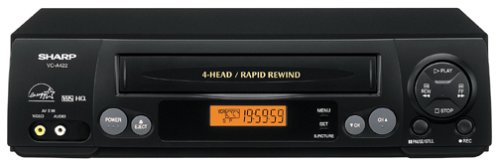
Slika: spredaj view of the Sharp VC-A422 4-Head VCR, showing the tape slot, display, and control buttons.
Nastavitev
1. Razpakiranje in namestitev
- Carefully remove the VCR from its packaging.
- Place the VCR on a stable, level surface. Ensure there is adequate space around the unit for ventilation.
- Avoid placing the VCR near heat sources, direct sunlight, or areas with high humidity.
2. Priključitev na televizor
To connect your VCR to a television, you will typically use RCA audio/video cables (red, white, yellow) or a coaxial cable.
- RCA Connection (Recommended for best quality):
- Connect the yellow video output jack on the VCR to the yellow video input jack on your TV.
- Connect the white audio output jack on the VCR to the white audio input jack on your TV.
- Connect the red audio output jack on the VCR to the red audio input jack on your TV.
- Select the corresponding AV input on your television (e.g., Video 1, AV1, Input 1).
- Koaksialna povezava:
- Connect a coaxial cable from the "RF Out" or "Antenna Out" jack on the VCR to the "Antenna In" or "RF In" jack on your TV.
- Connect your antenna or cable TV signal to the "RF In" or "Antenna In" jack on the VCR.
- Tune your television to channel 3 or 4 (depending on the VCR's output setting) to receive the VCR signal.
3. Napajalni priključek
- Plug the VCR's power cord into a standard electrical outlet.
- The VCR should enter standby mode, indicated by a clock display or power light.
Navodila za uporabo
1. Osnovno predvajanje
- Ensure the VCR is powered on and your TV is set to the correct input.
- Vstavite VHS kaseto v režo za kaseto. Videorekorder bo kaseto samodejno naložil.
- Pritisnite IGRAJ gumb na videorekorderju ali daljinskem upravljalniku.
- Če želite ustaviti predvajanje, pritisnite STOP gumb.
- Če želite začasno ustaviti predvajanje, pritisnite PREMOR gumb. Za nadaljevanje pritisnite znova.
- Za hitro previjanje naprej ali nazaj pritisnite FF (Hitro previjanje naprej) ali REW (Rewind) button. Press IGRAJ za nadaljevanje običajnega predvajanja.
- Za izmet traku pritisnite IZVRZI gumb.
2. Snemalni programi
The Sharp VC-A422 allows for recording television programs. Ensure a blank or recordable VHS tape is inserted and its safety tab is intact.
- Tune the VCR to the desired channel using the VCR's tuner.
- Pritisnite SNEMANJE button. The VCR will begin recording.
- Če želite ustaviti snemanje, pritisnite STOP gumb.
- For timed recordings, refer to the VCR's on-screen programming guide (if available) or consult the full manual for detailed timer recording instructions.
Vzdrževanje
Proper maintenance ensures the longevity and optimal performance of your VCR.
- Čiščenje zunanjosti: Wipe the exterior of the VCR with a soft, dry cloth. Do not use liquid cleaners or abrasive materials.
- Čiščenje glave: If picture quality degrades (e.g., snowy picture, lines), the video heads may be dirty. Use a dry-type VCR head cleaning cassette sparingly. Excessive use can wear down the heads.
- Nega traku: Store VHS tapes in their cases, away from dust, direct sunlight, and strong magnetic fields. Avoid exposing tapes to extreme temperatures.
- Prezračevanje: Keep the VCR's ventilation slots clear of obstructions to prevent overheating.
Odpravljanje težav
If you encounter issues with your Sharp VC-A422 VCR, refer to the following common problems and solutions:
| Težava | Možen vzrok | rešitev |
|---|---|---|
| Brez moči | Napajalni kabel izklopljen; vtičnica ni aktivna. | Preverite priključek napajalnega kabla. Preizkusite vtičnico z drugo napravo. |
| Ni slike ali zvoka | Incorrect TV input selected; A/V cables loose or incorrectly connected. | Select correct TV input (e.g., AV1, Video 1). Ensure A/V cables are securely connected to matching color ports. |
| Snowy or distorted picture | Dirty video heads; poor tape quality; incorrect channel for coaxial connection. | Use a VCR head cleaning cassette. Try a different tape. If using coaxial, ensure TV is on channel 3 or 4. |
| Tape will not eject | Power failure; mechanical issue. | Ensure VCR is powered on. If problem persists, seek professional service. |
| Ni mogoče snemati | Tape's safety tab removed; VCR not tuned to a channel. | Check if the safety tab on the VHS tape is intact (cover the notch with tape if removed). Ensure VCR tuner is set to the desired channel. |
Specifikacije
- Znamka: Ostra
- Model: VC-A422
- Glave: 4-Head (Video)
- Teža artikla: 6 funtov
- Dimenzije paketa: 15.55 x 11.02 x 5.24 palcev
- ASIN: B00005LABU
- Prvič na voljo: 4. september 1999
Opomba: Specifikacije se lahko spremenijo brez predhodnega obvestila.
Informacije o garanciji
This Sharp product is covered by a limited warranty. For specific details regarding warranty coverage, duration, and terms, please refer to the warranty card included with your purchase or visit the official Sharp webspletnega mesta. Shranite dokazilo o nakupu za uveljavljanje garancije.
Podpora uporabnikom
For further assistance, technical support, or service inquiries, please contact Sharp customer support. You can find contact information on the official Sharp webspletnem mestu ali v dokumentaciji, ki je priložena vašemu izdelku.
Visit the official Sharp store for more information: Sharp Official Store
Pravna izjava o omejitvi odgovornosti
OPOZORILO ZA POTROŠNIKE: This television receiver has only an analog broadcast tuner and will require a converter box after February 17, 2009 to receive over-the-air broadcasts with an antenna because of the U.S.'s transition to digital broadcasting. Analog-only TVs should continue to work as before with cable and satellite TV services, gaming consoles, VCRs, DVD players, and similar products. For more information, call the Federal Communications Commission at 1-888-225-5322 (TTY: 1-888-835-5322), or visit the commission s digital-television Web spletno mesto na: www.dtv.gov.


